
هوش مصنوعی فلاکس (Flux AI) که توسط Black Forest Labs توسعه داده شده است، یک مجموعه مدلهای هوش مصنوعی متن به تصویر است که عملکرد خیلی خوبی در تولید تصاویر باکیفیت دارد.
در این آموزش، ابتدا Flux و نحوه کار آن را معرفی میکنیم. سپس نحوه استفاده از آن را بهشکل تصویری نشان خواهیم داد.
هوش مصنوعی Flux چیست؟
Flux مجموعهای از مدلهای تصویرساز است که چندین ویژگی کلیدی ارائه میدهد. این ویژگیها Flux را از سایر مدلهای هوش مصنوعی مولد متمایز میکند که در ادامه هرکدام را توضیح خواهیم داد.
کیفیت بسیار بالای تصاویر تولیدشده
تستها و خروجی کاربران نشان داده که هوش مصنوعی متن به عکس Flux، در برخی موارد از مدلهای محبوبی مانند Midjourney v6.0 و DALL-E 3 پیشی میگیرد؛ چون در ترسیم بافت پوست، پارچه، رنگها و جزئیات تصویر، بیشتر از مدلهای دیگر به پرامپت و صحنه توجه میکند.
تنوع سبک
هنگام تولید عکس با Flux، میتوان سبکها و پیچیدگیهای صحنه را تعیین کرد تا تصاویر در زمینههای خلاقانه مثل داستانسرایی و تبلیغات هم قابل استفاده باشند.
خانواده مدلهای هوش مصنوعی Flux
خانواده مدلهای Flux از سه نوع تشکیل شده است:
۱. Flux Pro
۲. Flux Dev
۳. Flux Schnell
هر نوع برای موارد خاصی طراحی شده است که در ادامه توضیح خواهیم داد.
Flux Pro
Flux Pro مدل پرچمدار خانواده Flux است. این مدل عملکرد فوقالعادهای دارد که برای استفاده حرفهای در صنایعی که نیاز به تولید تصویر با کیفیت دارند، ایدهآل است. Flux Pro با قابلیت اتصال سریع به ابزارهای واسطه، ترسیم دقیق جزئیات بصری و تنوع خروجی، میتواند نیازهای پیشرفته را برطرف کند.
Flux Pro از طریق APIهای ارائهشده توسط Black Forest Labs و همچنین پلتفرمهایی مانند Replicate و fal.ai قابل دسترسی است.
Flux Dev
Flux Dev یک مدل Open-weight و سبکشده، براساس نسخه Pro است که برای استفادههای غیرتجاری طراحی شده است. نسخه Dev برای توسعهدهندگان، محققان و علاقهمندانی که میخواهند بدون نیاز به منابع سختافزاری قوی این مدل را تست کنند، ایدهآل است.
Flux Dev در پلتفرم HuggingFace، Replicate و fal.ai در دسترس است.
Flux Schnell
Flux Schnell سریعترین مدل در خانواده Flux است که برای ساخت عکس روی سیستم (بهشکل محلی) و استفاده شخصی طراحی شده است. این مدل بهشکل آزاد و تحت مجوز Apache 2.0، در دسترس عموم است که از طریق پلتفرم HuggingFace میتوان از آن استفاده کرد.
آموزش هوش مصنوعی Flux | تصویری و قدمبهقدم
هوش مصنوعی فلاکس رایگان است؛ ولی در ابتدا محدودیت اعتبار روی اکانتتان لحاظ میشود که میتوانید با استفاده از اکانت دیگر و Login، بارها از آن استفاده کنید. در مراحل زیر، بهشکل قدمبهقدم به شما آموزش هوش مصنوعی Flux را خواهیم داد.
نکته: محدودیت اعتبار فقط در نسخه آنلاین و پلتفرم Flux Playground است که با دانلود Flux برای ویندوز، مشکل حل میشود. این روش را در بخش بعدی آموزش خواهیم داد.
مرحله اول: ورود به سایت Flux Playground
عبارت “flux playground” را در گوگل جستوجو و روی اولین لینک کلیک کنید. بعد از ثبتنام، صفحه زیر نمایش داده میشود.
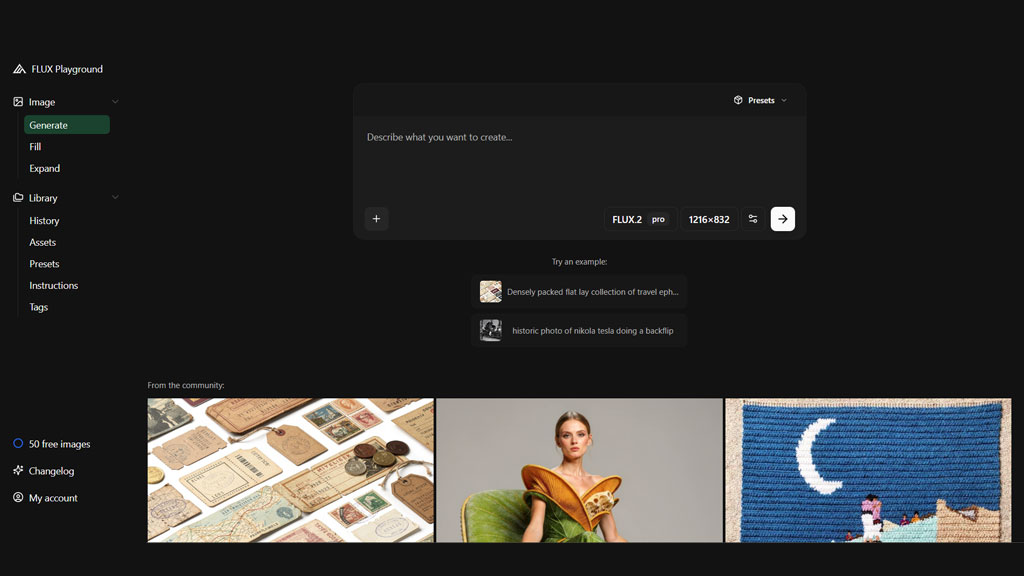
مرحله دوم: نوشتن پرامپت
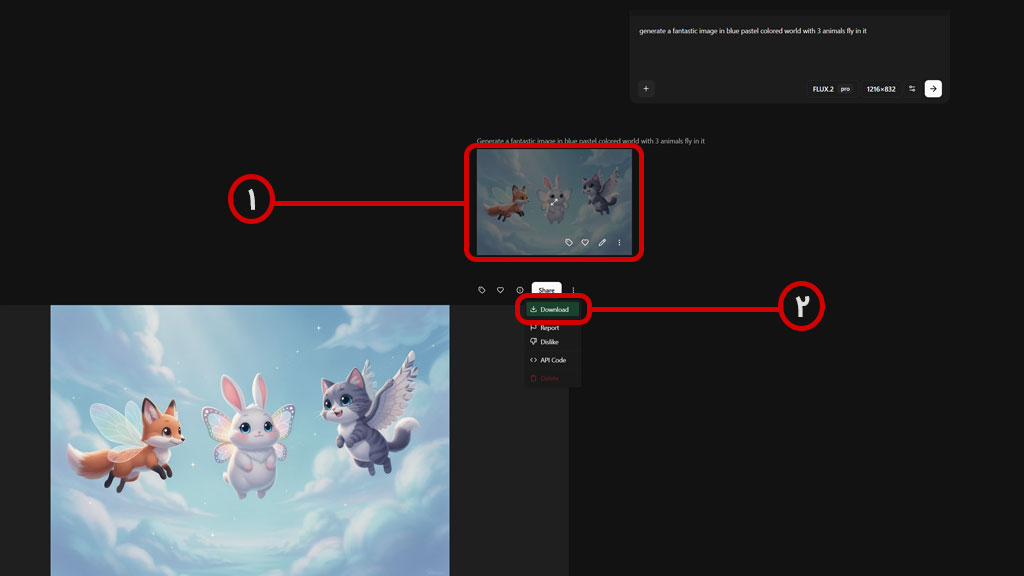
در این مرحله، باید با پرامپت نویسی به Flux بگوییم که چه میخواهیم. ما برای شروع، یک پرامپت خیلی ساده و تکخطی نوشتیم تا خروجی مدل را ببینیم.
| پرامپت |
| generate a fantastic image in blue pastel colored world with 3 animals fly in it |
مرحله سوم: دانلود عکس
برای دانلود عکس ساختهشده، در صفحه مقابل روی عکس کلیک کنید تا باز شود.
در صفحه جدید، روی سه نقطه بالا و سمت راست کلیک و گزینه Download را بزنید تا عکس دانلود شود.
دانلود Flux برای ویندوز و کار با آن
برای اینکه از هوش مصنوعی فلاکس رایگان روی ویندوز استفاده کنیم، نیاز به یک نرمافزار واسط به اسم Pinokio خواهیم داشت.
پس ابتدا باید این نرمافزار را نصب و مدل Flux را به آن اضافه کنیم.
مرحله اول: نصب Pinokio
عبارت “pinokio software” را در گوگل جستوجو و روی لینک اول کلیک کنید. پنجره زیر باز میشود که باید روی دکمه Download بزنید تا وارد صفحه جدیدی بشوید و بتوانید برنامه Pinokio را دانلود کنید.

زیر Step 1 یک دکمه با متن Download for Windows قرار دارد. روی آن کلیک کنید و نصب از دانلود فایل نصبی، آن را روی سیستمتان نصب کنید.
مرحله دوم: اضافه کردن Flux
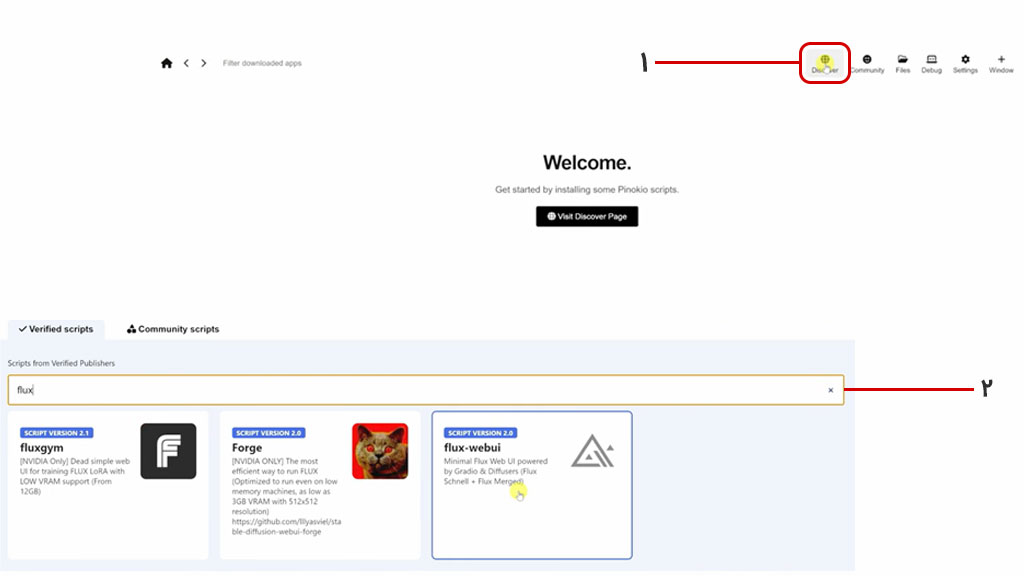
در صفحه اصلی نرمافزار Pinokio چیزی وجود ندارد و باید با کلیک روی دکمه Discover، فلاکس را انتخاب کنیم. پس مطابق تصویر زیر، روی دکمه Discover کلیک کرده و در کادر جستوجو، نام flux را بنویسید و flux-webui را انتخاب کنید.
در صفحه دانلود Flux برای ویندوز، پنجرهای مشابه تصویر زیر میبینید که باید روی دکمه Download آن کلیک کنید.
صفحه جدیدی باز میشود که تمام پیشنیازهای اجرای فلاکس روی سیستم را نشان میدهد. تمام این پیشنیازها توسط نرمافزار Pinokio نصب میشوند. فقط کافیست روی دکمه مشکی رنگ Install در پایین همین پنجره کلیک کنید.
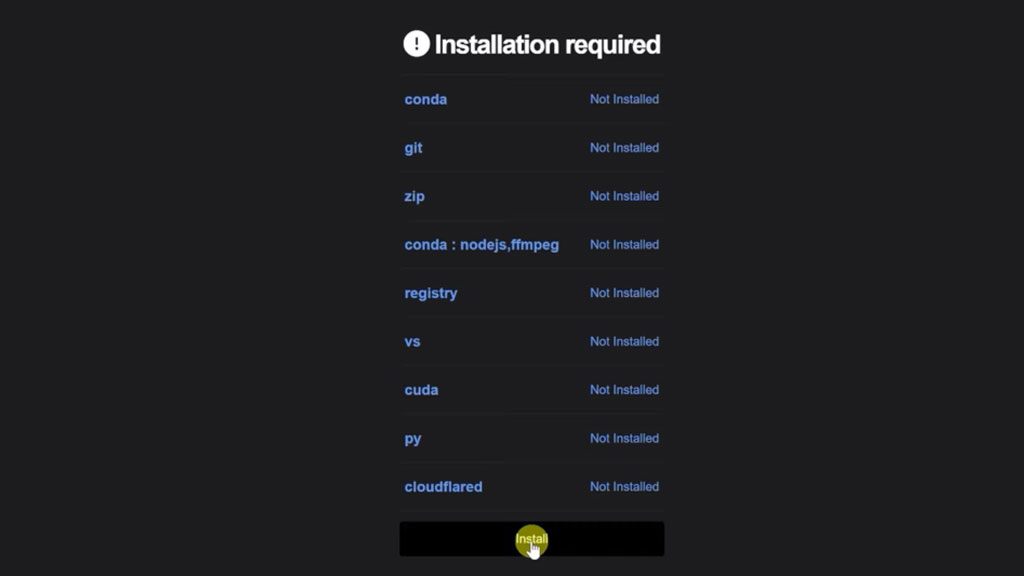
نصب بهشکل زیر و در محیط ترمینال ویندوز پیش میرود که جزئیات آن در نوار مشکی رنگ، گوشه راست و پایین صفحه قرار گرفته است. اگر روی این نوار کلیک کنید، وضعیت نصب و پیشرفت مراحل را میبینید.
مرحله سوم: تولید عکس با فلاکس
بعد از اینکه نصب فلاکس روی نرمافزار Pinokio تمام شد، صفحه زیر را میبینید که باید روی گزینه Open Web UI کلیک کنید تا بتوانید با فلاکس تصویر بسازید.
اگر روی کادر Model کلیک کنید، دو مدل میبینید:
1. FLUX.1-schnell
2. FLUX.1-merged
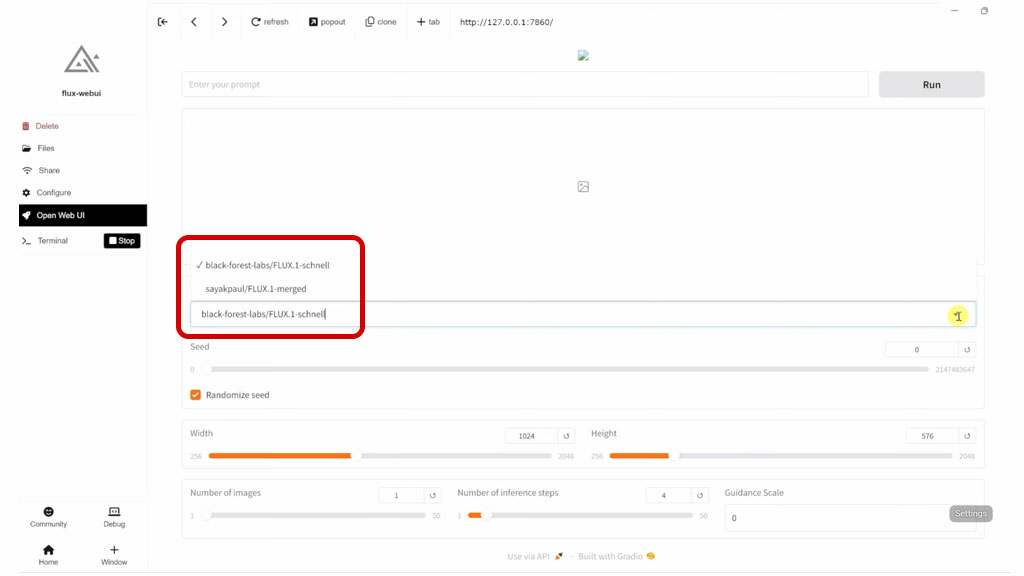
نسخه merged همان dev است که کیفیت عکسهای تولیدشده آن نسبت به Schnell بالاتر است. ما همین مدل را انتخاب و پرامپت زیر را به آن میدهیم.
| پرامپت |
| Transforming the photographed person into a realistic 3D figurine in front of a computer desk. The computer screen displays a 3D design drawing of the figurine’s software interface. The figurine has a transparent base, and next to it is its matching packaging box, allowing the figurine to be seen. The overall scene is in a realistic style, with the character presented in an ultra-realistic manner. The image quality reaches 4K high definition, the lighting effects are bright and layered, and the colors are saturated and vibrant, showcasing the exquisite imaging effect of high-end photography. Visual Tone: The scene is rich in color and visually impactful. The camera should be able to display different grand backgrounds, with detailed and lively elements in the background, creating an immersive experience. |
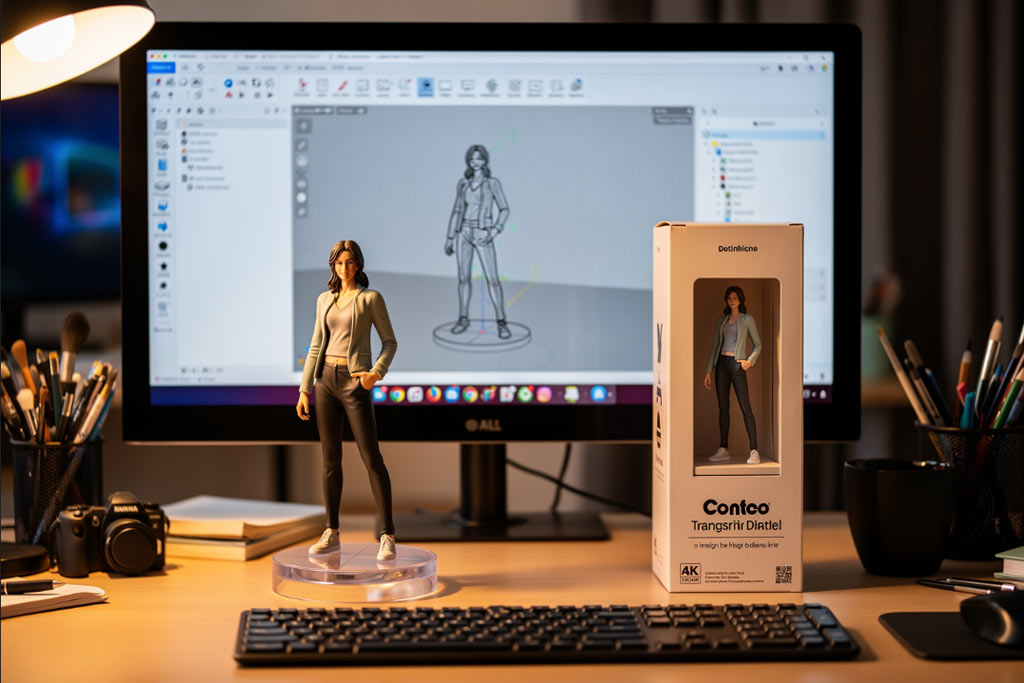
مرحله چهارم: دانلود تصویر
بعد از اینکه عکس تولید شد، دکمه دانلود را گوشه راست و بالای آن میبینید که با کلیک کردن، عکس روی سیستمتان دانلود میشود.
استفاده از Flux در اندروید
دانلود نرم افزار Flux برای اندروید امکانپذیر نیست؛ چون این هوش مصنوعی اپلیکیشن مجزا برای موبایل ندارد و باید بهشکل آنلاین، از یک سایت مرتبط استفاده کنیم. مراحلی که در ادامه مشخص کردهایم را قدمبهقدم با ما طی کنید.
مرحله اول: ورود به سایت
عبارت “flux ai” را جستوجو و لینک اول (با دامنه io) را باز کنید. با ایمیل یا اکانت گوگل وارد سایت شوید تا ۱۰ اعتبار رایگان در حسابتان شارژ شود.
مرحله دوم: نوشتن پرامپت
صفحه اصلی را کمی بهسمت پایین اسکرول کنید تا به بخش Flux AI Image Generator برسید. آن را لمس کنید تا به صفحه بعد بروید و پرامپتتان را در کادر مقابل بنویسید.
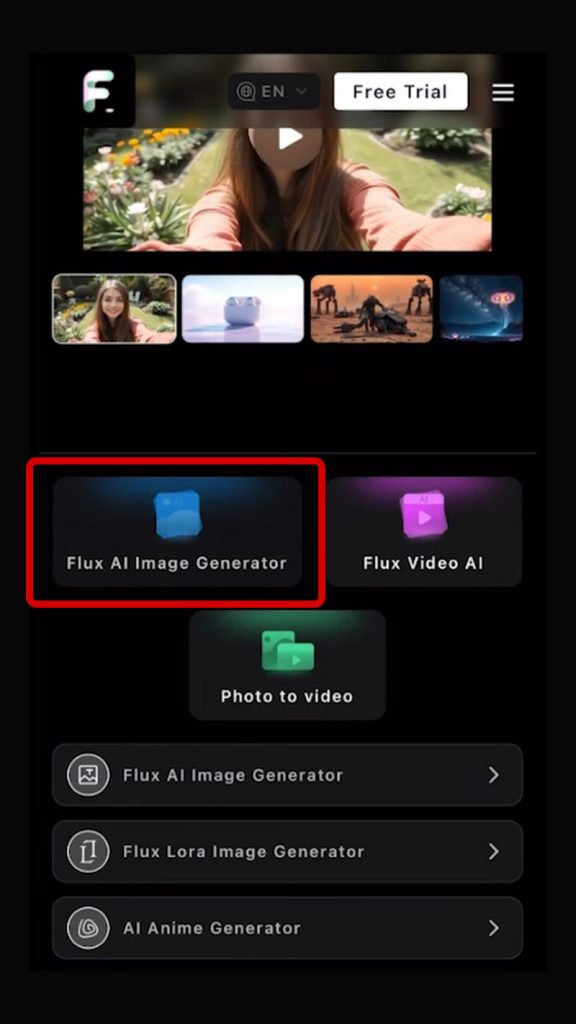
برای اینکه عکس تولید شود، دکمه GENERATE را لمس کنید. معمولا کمتر از ۱۰ ثانیه طول میکشد تا عکس تولید و در پایین همین صفحه نمایش داده شود.
آپدیت ۲۵ نوامبر: Flux 2
در ۲۵ نوامبر ۲۰۲۵، Black Forest Labs نسخههای جدید مدل تصویری FLUX.2 را معرفی کرد؛ نسخههایی که بیشتر از آنکه برای نمایش قدرت باشند، برای استفاده حرفهای و کنترل دقیق جزئیات طراحی شدند.
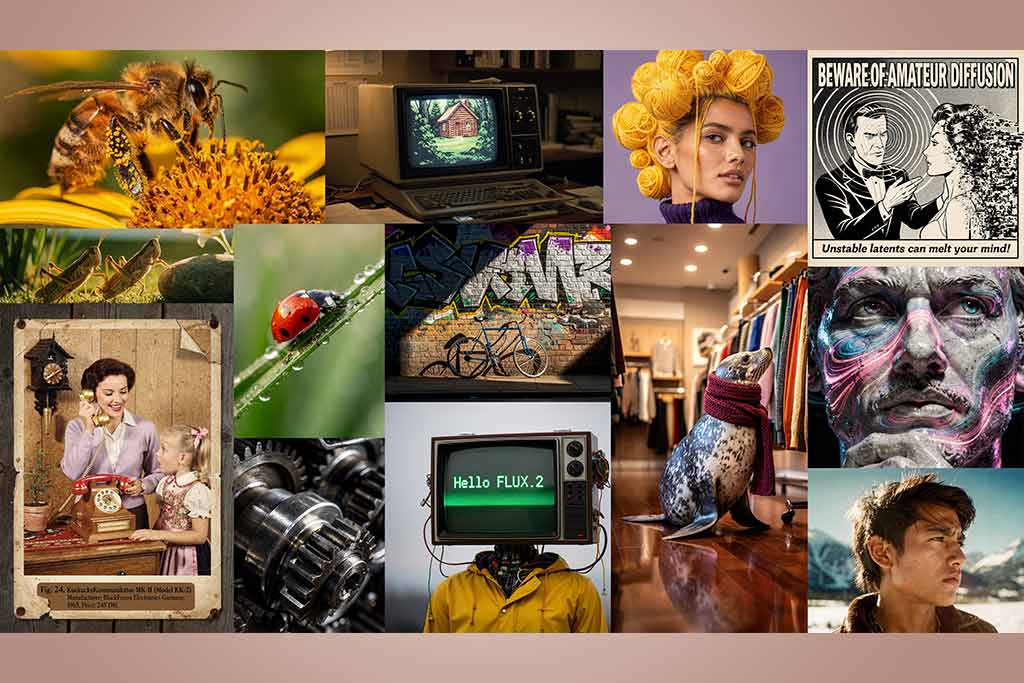
در این نسخه، امکان وارد کردن همزمان ده تصویر مرجع وجود دارد. با این کار، مدل بدون نیاز به تنظیم دوباره، سبک یا شخصیت کار را حفظ خواهد کرد.
از طرف دیگر، کیفیت خروجی بهتر شده است و نورپردازی، بافت پوست و جنس پارچه طبیعیتر رندر میشوند. دقت در متننویسی، اینفوگرافیک و نشانهگذاری هم بالاتر رفته است.
با توجه به ویژگیهای جدید، احتمالا این نسخه برای کارهای تبلیغاتی، طراحی گرافیک و تولید محتوای رسانهای گزینهای جذاب و مهم خواهد شد.
نسخههای جدید در Flux 2
بهروزرسانی فلاکس به ورژن ۲، در سه نسخه زیر اعمال شده است.
۱. Pro
Flux.2 Pro برای کاربرهایی توسعه یافته که سرعت و کیفیت همزمان را میخواهند؛ بدون اینکه یکی قربانی دیگری شود.
۲. Flex
این نسخه برای کسانی است که کنترل کامل روی جزئیات تصویر برایشان مهم است و مایلند مراحل تولید، مقیاس راهنمایی و جزئیات دقیق خروجی را خودشان تنظیم کنند.
۳. Dev
نسخه Dev با وزنهای باز منتشر شده تا پژوهشگرها بتوانند به راحتی روی آن کار کنند و حتی LoRA آموزش دهند.
LoRA یک تکنیک بهینهسازی شبکه عصبی مصنوعی است که با اضافه کردن ماتریسهای رتبه پایین، عملکرد مدل را برای وظایف خاصی بهبود میبخشد.
معماری مدل dev بر پایه جریان تطابق نهان طراحی شده و همراه با مدل زبان-بینایی، درک بهتری از فضا، نور و بافت دارد.
Flux.2 نسخهای نیست که صرفا برای قدرتنمایی معرفی شده باشد؛ بلکه نتیجه و خروجی آن بیشتر از همیشه به مهارت کاربر در پرامپتنویسی و کنترل مدل بستگی دارد.
آپدیت جولای ۲۰۲۶: FLUX 3
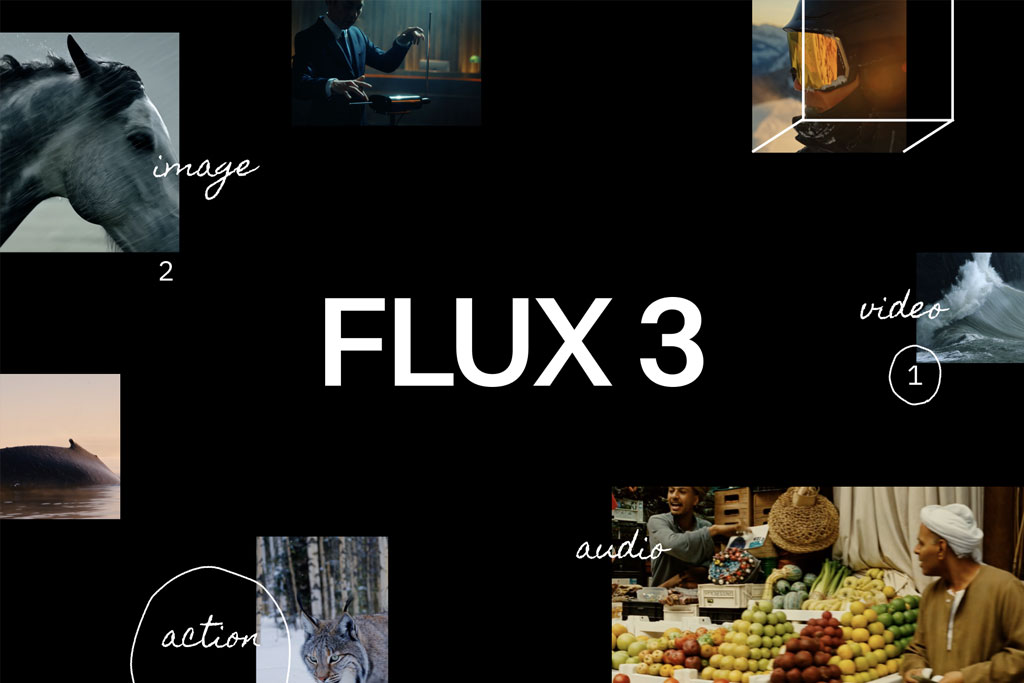
شرکت آلمانی Black Forest Labs مدل FLUX 3 را با این عنوان معرفی کرد: “One multimodal model for Image, Video, Audio, Action-Prediction”. این شرکت دامنه فعالیتهای مدل FLUX را از تصویر بهسمت رسانههای دیگر ازجمله ویدیو، صدا و پیشبینی حرکت سوژه گسترده کرد.
درواقع FLUX 3 یک مدل بنیادی چندوجهی است که همزمان از تصاویر، ویدیوها و صدا در خروجی استفاده میکند. این مدل حالا میتواند ویدیوهایی تا ۲۰ ثانیه بسازد و با صدای کاملا هماهنگشده، خروجی را تحویل دهد.
این استارتاپ آلمانی بلندپروازی خود را به واژه جدیدی رسانده است: Visual Intelligence یا هوش بصری. هدف از بهکار بردن این واژه، نشان دادن جاهطلبی Black Forest Labs است که میخواهد چنین مفهومی را بهمعنی یکپارچهسازی محیط فیزیکی و دیجیتالی بین کاربران جا بیندازد.
معماری هوش مصنوعی عکس ساز FLUX 3
روش اختصاصی استارتاپ آلمانی Black Forest بهنام Self-Flow در معماری FLUX 3 اجرا شده است. در این رویکرد هماهنگسازی تولید تصویر و درک محتوای چندوجهی در همان معماری زیربنایی انجام میشود و مصرف انرژی و منابع سختافزاری به حداقل میرسد.
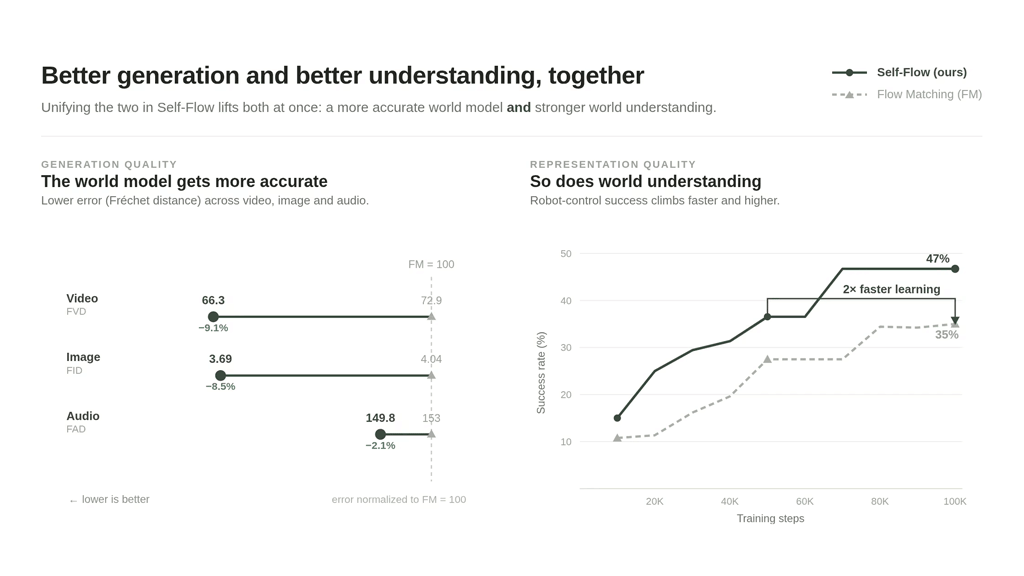
ویژگیهای مدل FLUX 3 در ساخت ویدیو
طبق ادعای شرکت سازنده، FLUX 3 میتواند ویدیوها را به روشهای زیر بسازد.
- تولید ویدیو از پرامپت متنی
- لبخوانی (Lip Sync)
- امکان ساخت پیشنویسی از ویدیو مدنظر در قالب یک Draft، ویرایش آن و نهاییسازی برای تولید نسخه نهایی
- ساخت ویدیو با تصاویر آپلودشده بهعنوان مرجع یا ادامه ساختن از یک فریم شروع (مانند انیمیشن)
- تولید ویدیو از یک کلیپ مرجع و حفظ عناصر اصلی آن در خروجی – بهعنوان مثال همان شخصیت
- تغییر یک صحنه و ایجاد زمینه جدید در ویدیو مرجع
- ساخت ویدیو از ادامه ویدیو قبلی و صداگذاری متناسب با صحنه
- تولید ویدیو از فریم کلیدی مشخصشده برای تصویرسازی بین فریمها
- سبکهای بصری و نسبتهای ابعاد متنوع
- وصل کردن ویدیوهای منفرد به یک ویدیو طولانیتر با استفاده از عاملهای هوشمند
- تولید تایپوگرافی و طرحهای متحرک
پیشرفت تصویرسازی در مدل FLUX 3
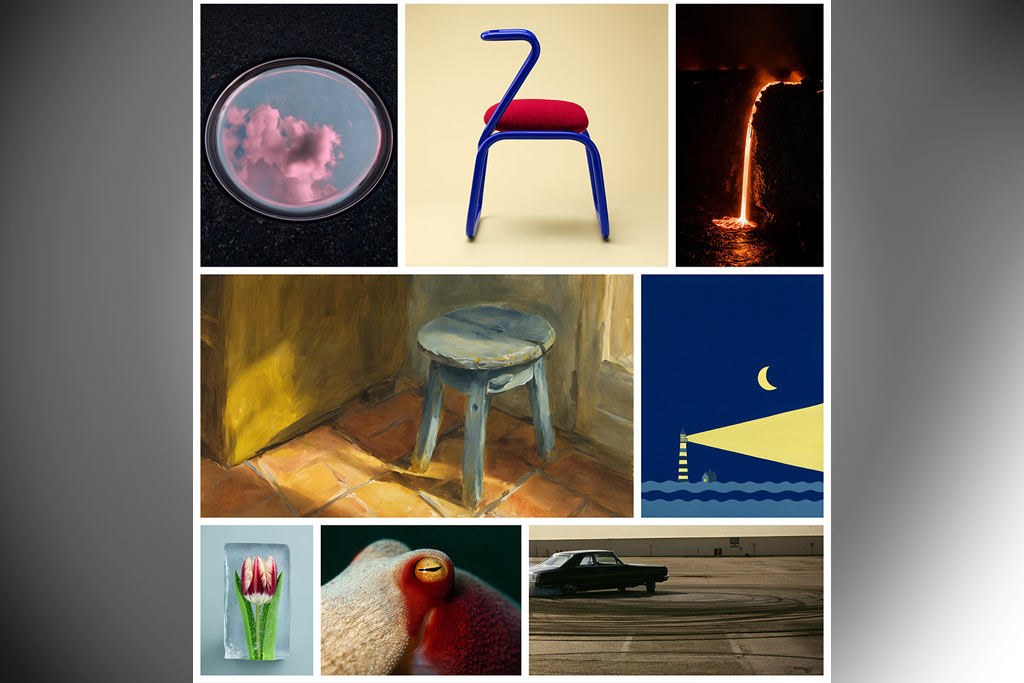
FLUX 3 در رندر متن روی عکس و درک جهان واقعی، پیشرفت خوبی نسبت به مدل قبلی (یعنی FLUX 2) کرده است. گرچه کلیت این بهروزرسانی همچنان پابرجا است، اما تولید تصویر در سبکهای مختلف، چندین نسبت برای ابعاد و امکان تنظیم وضوح، قابلیتهایی هستند که در تصویرسازی اهمیت زیادی دارند.
همچنین این مدل توانایی مدیریت پرامپتهای طولانی و پیچیده، تولید متن طبق نوشتههای کاربر و تنظیم سبک خروجی را دارد که در مدل قبلی وجود نداشت.
قابلیت پیشبینی حرکت سوژه و ساخت ویدیوهای خلاقانه
FLUX 3 قابلیتی بهنام Action دارد که میتواند دینامیک دنیای فیزیکی را بهخوبی درک کند و تصمیمگیری مدل برای ساخت ویدیو را راحتتر کند.
جدول مقایسه قدرت تصویرسازی FLUX 3 و MidJourney
| ویژگی | FLUX 3 | MidJourney V8.2 |
| تمرکز اصلی | – فتورئالیسم- تایپوگرافی دقیق- پیروی کامل از پرامپت | – زیباییشناسی- انواع سبک هنری- بافت و رنگ غنی |
| کیفیت سبک هنری | – بالا در فتورئالیسم- حفظ جزئیات در عکسهای مبتنی بر آناتومی و متن | بسیار بالا |
| رندر متن داخل تصویر | عالی | متوسط |
| پیروی کامل از پرامپت کاربر | ⭐⭐⭐⭐⭐ | ⭐⭐⭐ |
| نحوه دسترسی | – وزنهای باز با توزیعهای Schnell و Dev – API- Self-host | – بسته و میزبانیشده از طریق وب و Discord- بدون Self-host |
| سرعت | – بسته به پیکربندی- حدود ۵–۱۵ ثانیه | متوسط (بیش از ۱۰ ثانیه) |
| هزینه | – API ~۰.۰۱ تا ۰.۰۷ دلار به ازای هر تصویر- نسخههای باز رایگان | اشتراک ماهانه ۱۰ تا ۱۲۰ دلار |
| بهترین زمینه کاربرد | – عکس محصولعکسهای متنمحور- یکپارچهسازی API | – هنر مفهومیبرندینگکمپینهای گرافیکی |
جدول مقایسه تصویرسازی FLUX و Nano Banana
| ویژگی | FLUX 3 | MidJourney V8.2 |
| حالتهای اصلی | – Text/Img-to-Video- Keyframe- Clip Extension- Draft | – Text-to-Image- Conversational Editing- Background Removal- Upscale تا 4K- Fusion چند تصویر |
| رزولوشن عکس | فعلا تا 2k | تا 4k |
| متن داخل تصویر | رندرینگ دقیق چندزبانه و درک متنهای طولانی | دقت بالا در تایپوگرافی و متن |
| امکان کنترل پرامپت | ✅ | ✅ |
| ثبات کاراکتر/برند | ✅ | ✅ |
بهترین پرامپت های FLUX 3
اگر میخواهید بهترین پرامپت های FLUX 3 را بنویسید، باید ترتیب زیر را رعایت کنید:
- موضوع
- صحنه
- سبک
- ترکیببندی
- نورپردازی
- کیفیت
اگر این ترتیب را رعایت کنید، مدل دیگر صحنه و جزئیات عکسها را حدس نمیزند و دقیقا چیزی را میسازد که مدنظرتان است. علاوه بر این، ویرایش عکسها آسانتر میشود؛ چون میتوانید بهجای بازنویسی کل پرامپت، فقط یک بخش را اصلاح کنید.
بنابراین:
- با موضوع شروع کنید و لباسها، ژستها، اشیا یا جزئیات محصول را بهدقت توصیف کندی.
- صحنه را با مکان، زمان روز و زمینه یا کاربرد تنظیم کنید.
- قبل از قاببندی دوربین و نور، نام سبک را قید کنید.
- نور را با عبارات بصری ساده مانند نور ملایم پنجره از سمت چپ توصیف کنید.
- قوانین کیفیت و متن را بنویسید؛ مثلا sharp focus یا extra text
- در هر تغییر، فقط روی یک لایه از تصویر دست بگذارید و ۳-۴ کلمه را برای ساخت مجدد عکس ویرایش کنید.
۷ تا از بهترین پرامپت های ساخت عکس با FLUX 3
| عملکرد | پرامپت به انگلیسی |
| تصویر پرتره در ساعت طلایی روز | A photorealistic editorial headshot of [YOUR PHOTO / SUBJECT], shot on a Sony A7R V with an 85mm f/1.4 lens, golden-hour backlight wrapping the hair with a soft rim, shallow depth of field melting the background into creamy bokeh, warm skin tones, visible pore-level skin texture, catchlights in the eyes, magazine cover composition, ultra-detailed, 4k |
| پرتره چهره برای تبلیغ یک محصول آرایشی | A clean high-key studio beauty portrait of [SUBJECT] against a seamless white backdrop, large softbox key light at 45 degrees plus a fill reflector, even flattering exposure, dewy natural skin, subtle freckles, glossy lips, sharp focus on the eyes, shot on a 100mm macro lens, commercial cosmetics look, ultra-detailed, 4k |
| پرتره بهسبک فیلمهای قدیمی سیاه و سفید | A black-and-white film-noir portrait of [SUBJECT], hard directional light through venetian blinds casting striped shadows across the face, plume of cigarette smoke, fedora, 1940s detective mood, high-contrast monochrome, shot on Ilford HP5 film grain, 50mm lens, dramatic and timeless, ultra-detailed. |
| پرتره دراماتیک برپایه نقاشی | A moody close-up portrait of [SUBJECT] lit only by a single window, classic Rembrandt triangle of light on the cheek, deep shadow side, dark muted background, pensive expression, fine film grain, shot on a 50mm f/1.2 lens, low-key cinematic mood, painterly chiaroscuro, ultra-detailed. |
| جلد کتاب دستور غذا | Shot on a Fujifilm X100V with its film simulation set to Classic Chrome, this image portrays a family gathered around a dinner table in a modern apartment, sharing a meal and engaging in conversation. Soft lighting from a pendant lamp above creates a warm and inviting atmosphere. The title “Family Feasts: Recipes for Everyday Gatherings” is subtly incorporated into the scene, perhaps as a book lying on the table or as a handwritten note on a chalkboard in the background. |
| باریستا در حال آرت زدن روی کاپ قهوه | A close-up shot captured with a Canon EOS 5D Mark IV and a 100mm f/2.8L IS USM macro lens, settings at f/4, 1/200 sec, ISO 400. The frame intimately captures a barista’s weathered hands as they expertly craft a cappuccino. The focal point is the precise moment of milk pouring into the rich espresso, creating the initial swirls of the rosetta pattern. Wisps of steam dance upward from the polished La Marzocco machine in the soft background bokeh. Natural light streams in from a nearby window, catching the micro-droplets of steam and creating a gentle halo effect. The composition follows the rule of thirds, with the pour point positioned at the lower right intersection. Warm tones dominate, from the deep mahogany of the espresso to the creamy white of the steamed milk, while the stainless steel accents of the machine provide cool highlights. |
| نمای بسیار نزدیک از جزئیات صورت انسان | Extreme macro close-up of a human face, focus on micro-pores and fine vellus hair (peach fuzz), moisture droplets on the skin, a reflection of a softbox in the pupil, 100mm macro lens, f/2.8, shallow depth of field, authentic sub-surface scattering, shot on Sony A7R IV with 61MP sensor, hyper-realistic skin texture, natural skin imperfections, 8K resolution |
۷ بهترین پرامپت های ساخت ویدیو با FLUX 3
| عملکرد | پرامپت به انگلیسی |
| استاپ موشن | Stop-motion clay animation, visible fingerprints in the clay, slightly uneven frame timing, shot on a small tabletop set. A stout clay figure in a knitted hat tries to post an oversized letter into a postbox slot, folding it smaller and smaller until it fits, then looking pleased with itself. Sound: the dry scrape of clay against the postbox, paper creasing, a jaunty ukulele under the whole thing. |
| موشن گرافیک | Clean 3D motion design on a deep navy background, soft studio lighting, no camera shake. Six matte-white spheres drop into frame from above, bounce with real weight, and settle into a perfect hexagon. As the last one lands, a thin gold ring draws itself around the whole group. Sound: a soft low thud per sphere as it lands, then a single bright chime as the ring completes. No voices. |
| فضای اتاق | A locksmith’s workshop late in the evening, one bare bulb over the bench, brass filings on the wood. A hand turns a half-cut key against a grinding wheel, sparks arcing off in short bursts. Sound: the rising whine of the wheel each time the key touches it, filings ticking onto the bench, a radio murmuring in another room too quietly to make out words. No music. |
| زن پاروزن | A night fishing boat tied up at a small harbour, a woman in oilskins coiling rope under a sodium lamp. She looks up at the camera and says, “You are three hours late.” Sound: her line clear over rope creaking, water slapping the hull, a halyard tapping a mast. No music. |
| سه شات در یک عکس | Three shots of the same baker, early morning, same flour-dusted apron throughout. Shot one, wide: she pulls a tray of loaves from a deck oven, steam rolling out. Then shot two, close: her hands turning a loaf over to knock the base. Finally shot three, medium: she sets it in a basket by the window as light comes through. Sound: one continuous bed across all three, oven door clunking, the hollow knock on the crust, a street waking up outside. No music, no dialogue. |
| ویدیو کوتاه از گردنبند لاکشری | A three-beat spot for a high jewellery house. It opens on a diamond necklace laid out on black velvet in total darkness, then a hard beam sweeps across it and fires the stones into colour one at a time, then a hand in a black silk sleeve lifts it clear and fastens it at the nape of a neck, the stones throwing points of light across the collarbone as they settle. Macro for the sweep, a slow push-in for the fastening, a high-contrast grade with pure black around everything. The whisper of silk, a faint chain sound, one sustained cello note and nothing else. |
| ولاگ زندگی از یک روز زمستانی در کره جنوبی | Create a 30-second, 1080p ultra-realistic personal home-video showing an ordinary winter morning in the life of a young Korean woman. No reference image.MAIN SUBJECTYoung Korean woman in her early 20s, naturally pretty, realistic skin texture, minimal makeup, bright and energetic personality.Wavy dark brown hair worn loose past her shoulders, a thick knit beanie pushed back slightly on her head. Wearing a puffy navy winter coat over a cream turtleneck, straight-leg jeans, white sneakers and a striped scarf loosely wrapped around her neck.Maintain the same face, hairstyle, clothing, body proportions and overall appearance throughout the entire video.SETTINGA quiet residential neighborhood in northern Seoul during a cold winter morning. Narrow snow-dusted streets, low brick houses, steam rising from a street-corner odeng stand, parked delivery scooters covered in frost, tangled power lines against a pale sky, a small stationery shop with a hand-painted sign, and thin patches of old snow lining the curbs.Everything should feel lived-in, ordinary and peaceful. No tourist attractions, advertisements, recognizable brands or commercial activity.CAMERA / VISUAL AESTHETICRaw personal footage casually recorded by a friend on an early-2000s consumer DV camcorder.Strong handheld shake, imperfect framing, autofocus hunting, exposure shifts, occasional motion blur, faded colors, soft digital detail, mild noise, accidental zooms and natural camera imperfections.No stabilization, drone footage, gimbal movement, dramatic lighting or polished commercial cinematography.— LEAVING THE HOUSEShe steps out of a gate, breath visible in the cold air. She tugs her beanie down over her ears and looks toward the camera, laughing and shivering dramatically.She rubs her gloved hands together as she starts walking down the frosty street.— ODENG STAND STOPShe stops at a small steaming street stand and buys a cup of hot odeng broth.She blows on it carefully, takes a sip, and sighs in relief at the warmth.She notices her friend filming and holds the cup toward the camera, grinning and saying something teasing before taking another sip.— WALKING THROUGH THE NEIGHBORHOODShe continues down the street, boots crunching softly on old snow.She passes a delivery worker loading boxes onto a scooter and gives a small wave; he nods back.She pauses to peek into the window of the small stationery shop, fogging the glass slightly with her breath.— SMALL ACCIDENTShe steps onto a thin icy patch on the pavement and slips slightly, arms flailing for balance before catching herself on a nearby railing.She freezes for a second, wide-eyed, then bursts out laughing at herself.She looks at the camera, still catching her breath, and says:”Ya, geochyeo!” (“Hey, watch it!”)— QUIET MOMENTShe reaches a small bus stop bench and sits down, wrapping both hands around the cup |
۷ مورد از بهترین پرامپت های FLUX 3 برای تبدیل عکس به ویدیو
| عملکرد | پرامپت به انگلیسی |
| ایجاد حرکت و صدا روی یک عکس | Bring the reference to life with minimal invention. Keep the subject, wardrobe, framing, and colour exactly as they are. Add only what the moment needs: a slow breath, a small shift of weight, hair and fabric moving in a light breeze, one blink. The camera drifts in almost imperceptibly across the clip. Sound: the ambience this location would actually have, nothing dramatic, no music. |
| ساخت ویدیو از عکس با حرکت دوربین و تغییر نمای آن | Hold the subject in the reference exactly as framed and move the camera around it in one slow arc, roughly ninety degrees, keeping the subject centred and the same size in frame throughout. Lighting shifts naturally as the angle changes. Nothing else in the scene moves. Sound: quiet location ambience and the faint low rumble of the move. No music. |
| عکس مرجع بهعنوان استایل ثابت در ویدیو | Use the references for palette, lighting, texture, and general atmosphere, not as frames to reproduce. Generate a new shot in that same visual world: a cyclist riding a narrow lane between tall hedges at the same time of day, camera tracking alongside at wheel height. Match the grade and the grain of the references. Sound: tyres on loose gravel, chain and freewheel ticking, birds in the hedges. No music. |
| ساخت ویدیو براساس دنیای واقعی با یک سبک مرجع برای سوژه | Keep the person from the references exactly as they appear, and place them into a wider version of the same environment. They walk from the back of frame toward the camera and stop just short of it, looking off to one side rather than at the lens. Camera static at chest height. Sound: footsteps on the surface underfoot, ambience appropriate to the location, no music. |
| تبدیل عکس محصول به ویدیو تبلیغاتی | The camera slowly orbits clockwise around the product on a white background. Soft shadows shift naturally as the perspective changes. |
۳ پرامپت ساخت ویدیو با حفظ جزئیات سوژه (Consistent Character)
| عملکرد | پرامپت به انگلیسی |
| یک سوژه و سه نما | Keep the person in the references identical across every shot: same face, same hair, same jacket. Three shots in sequence. Wide, they stand at a bus stop checking a paper timetable. Medium, they fold it and put it in a pocket. Close, they look up as headlights wash across their face. Same overcast light throughout. Sound: one continuous street bed, paper folding, a bus approaching under the last shot. |
| حفظ ثبات کاراکتر در عین تغییر لوکیشن | Keep the character from the references unchanged in face, build, and costume. Shot one: they push open a heavy door from inside a dim stairwell. Shot two: the same person outside on a bright street, squinting, adjusting to the light, walking out of frame left. The light changes hard between the two shots but the person does not. Sound: the door mechanism and stairwell echo, then open street noise arriving abruptly on the cut. |
| ساخت لوگو مسکات از سوژه تصویر | Use the same mascot from the reference image. Preserve the exact head shape, eyes, mouth, body shape, costume, logo placement, brand colors, proportions, and overall character design. In this scene, the mascot moves from left to right. Keep the mascot friendly, recognizable, and on-brand. Do not change the logo, colors, costume, facial design, or body proportions. |
۴ بهترین پرامپت های ادامه دادن ویدیو با FLUX 3
ابتدا باید یک کلیپ را آپلود کنید و Flux 3 از جایی که تمام شده است، آن را ادامه میدهد. حرکت، قاببندی و منطق صحنه چیزهایی هستند که FLUX 3 به ویدیوتان اضافه میکند. بنابراین پرامپت فقط باید بگوید که در ادامه چه اتفاقی باید بیفتد.
| عملکرد | پرامپت به انگلیسی |
| بدون کاتزنی یا تغییر جزئیات ویدیو اول | Continue from the final frames with no cut and no change of camera. Keep the same motion, framing, lens, grade, and pace. Let the action already in progress simply finish, then hold the shot for a beat on the result. Sound: continue the existing ambience without a seam. |
| ادامه و اصلاح بعضی از صحنهها | Pick up exactly where the clip ends, same shot, and bring the movement to a stop. Whatever is travelling slows and settles. The camera settles with it and holds steady. Nothing new enters frame. Sound: the existing bed thinning out as motion stops, ending on quiet room tone. |
| ورود شخص دوم به صحنه | Continue from the last frames in the same unbroken shot, then let one new element enter: a second person walks in from frame right, stops beside the subject, and looks at the same thing they are looking at. Neither speaks. The camera stays where it is. Sound: the existing ambience continuing, footsteps arriving and stopping. |
| ایجاد نمای Wide | Continue the clip and pull the camera back steadily to reveal the wider location around the subject, ending on a wide that shows where this has been happening all along. Keep the subject in frame throughout the move. Sound: the close ambience opening out into a broader, more distant version of itself. |
بهترین پرامپت FLUX 3 برای ادامه دادن صدای ویدیو و تغییر عکس
| عملکرد | پرامپت به انگلیسی |
| ادامه صدا، تغییر تصویر | Continue from the final frames, keeping the soundtrack unbroken and consistent with what came before. Cut once, to a different angle on the same scene, then hold. The sound must not break or restart across the cut. Sound: one continuous bed running through the cut, with the perspective of the noise shifting slightly to match the new angle. |
مروری بر هوش مصنوعی فلاکس
Flux قابلیتهای فوقالعادهای ارائه میدهد و شرکت سازنده در تلاش است تا عملکرد آن را بهتر کند. کار با این مدل متن به تصویر بسیار ساده است و امکان استفاده از آن هم بهصورت آنلاین، هم بهصورت آفلاین و روی ویندوز فراهم است. اگر خروجی فلاکس مطابق میلتان نبود، تصویر تولیدشده را با ابزارهای دیگر بهبود دهید؛ چون هنوز مدلها در ارائه یک خروجی کامل قدرت چندانی ندارند و بهتر است ما بهشکل موازی، از نقاط قوت هرکدام از ابزارها بهره ببریم.
سوالات متداولی که درباره هوش مصنوعی FLUX میپرسید
۱. هوش مصنوعی Flux چیست؟
هوش مصنوعی Flux محصول کشور آلمان و استارتاپ Black Forest Labs است که عکس، ویدیو و صداهای متناسب با آن را تولید میکند.
۲. کدام نسخه Flux ویدیو میسازد؟
Flux 3.
۳. آیا هوش مصنوعی Flux لبخوانی دارد؟
بله. قابلیت Lip Sync یکی از قابلیتهای این هوش مصنوعی اروپایی است.
۴. چگونه بهترین پرامپت را برای ساخت عکس با Flux بنویسیم؟
از ۶ ترتیب که شامل موضوع، صحنه، سبک، ترکیببندی، نورپردازی و کیفیت هستند استفاده کنید تا عکس مطابق ایده شما و با جزئیات کامل ساخته شود.
۵. چگونه جزئیات صحنه را در پرامپت تعیین کنیم؟
صحنه را با مکان، زمان روز، زمینه یا کاربرد برای هوش مصنوعی Flux مشخص کنید.